


Software plays an important role in modern businesses. A Corporate Software Inspector helps companies identify software issues, protect information, and improve system performance. Companies use software to manage daily operations, communicate with customers, and increase productivity. Effective software inspection helps organizations reduce security risks, prevent costly errors, and resolve problems before they affect business operations.
A Corporate Software Inspector helps organizations examine software quality, functionality, reliability, and compliance with technical requirements. This role may involve reviewing software systems, checking application behavior, identifying defects, and documenting problems that require attention. The exact responsibilities depend on the organization’s size, industry, and software development process.
.Corporate software inspection can help businesses maintain reliable applications, reduce errors, and support better technology decisions In this guide, you will learn what a corporate software inspector does, which skills the role requires, how software inspection works, and which practices can improve the inspection process.
What Is a Corporate Software Inspector?
A corporate software inspector is a technology professional who examines software applications, systems, or code to identify defects, quality issues, security concerns, and possible compliance gaps.
The main purpose of this role is to help ensure that software meets defined requirements and performs as expected. An inspector may examine an application before its release, review an existing business system, or evaluate software after updates and changes.
For example, a company might use a customer relationship management (CRM) system to manage customer records and sales activities. A corporate software inspector could review important functions, check data handling, identify errors, and document problems that need correction.
The inspector may work with software developers, quality assurance teams, cybersecurity specialists, system administrators, and business managers. In some organizations, these duties belong to a dedicated inspector. In others, software testers or quality engineers perform similar tasks.
Why Is Corporate Software Inspection Important?
Software problems can interrupt business operations and affect customer satisfaction. A faulty application might process information incorrectly, display inaccurate reports, or prevent employees from completing essential tasks.
Regular inspection helps organizations identify potential problems earlier. It also provides documented findings that technical teams can use to prioritize repairs and improve software performance.
Inspection does not guarantee that software will be free from every defect. However, a structured process can reduce avoidable errors and provide greater confidence in software quality.
Key Responsibilities of a Corporate Software Inspector
A corporate software inspector performs several tasks to evaluate software and communicate findings. Responsibilities vary by organization, but the following duties are common in software quality and inspection work.
1. Inspect Software Quality and Functionality
One of the primary responsibilities is checking whether software functions according to its requirements. The inspector may review application features, examine system behavior, and verify that important workflows produce the expected results.
For example, an inspector working with an online payment system might check whether transactions are recorded correctly, error messages appear when necessary, and payment records remain consistent.
These checks help businesses identify functional problems before they affect users.
2. Identify Bugs and Technical Errors
Software defects can appear in calculations, user interfaces, data processing, integrations, or application workflows. A corporate software inspector examines relevant areas to identify issues that could affect reliability.
When an issue appears, the inspector documents the steps required to reproduce it, the expected result, and the actual result. Screenshots, logs, and other supporting evidence may also be included.
Clear documentation helps developers understand the problem and investigate its cause. The inspector may then verify the correction after the development team provides an updated version.
3. Review Software Security
Security is an important consideration when inspecting corporate applications. Business software may handle customer information, employee records, financial data, or confidential company documents.
Depending on their responsibilities and authorization, inspectors may review access permissions, authentication behavior, data handling, and known security weaknesses. Specialized security assessments may require qualified cybersecurity professionals.
For example, an inspector might discover that an employee account has access to information outside its assigned responsibilities. Documenting this issue helps the organization review and correct its access controls.
A software inspection should support security practices, but it does not replace a comprehensive security audit or penetration test when those assessments are necessary.
4. Check Compliance With Requirements and Policies
Organizations often establish technical standards, internal policies, and regulatory obligations for their software systems. An inspector may check whether an application follows the requirements that apply to it.
These checks can involve documentation, data access, software configuration, record management, and required approval processes.
For example, a business that handles personal information may need to review how its software collects, stores, and restricts access to that information.
The inspector should document any identified gaps and refer specialized legal or regulatory questions to the appropriate experts.
5. Prepare Inspection Reports
Inspection findings become useful when teams can understand and act on them. Corporate software inspectors therefore prepare reports that describe discovered issues and recommend suitable next steps.
A report may include:
- A description of each identified issue.
- Steps to reproduce the problem.
- The expected and actual results.
- The potential effect on users or business operations.
- The severity or priority of the issue.
- Supporting evidence and recommended actions.
Well-organized reports help managers understand risks and help technical teams decide which problems require immediate attention.
6. Collaborate With Technical Teams
Software inspection often requires cooperation between several departments. Inspectors may discuss defects with developers, review requirements with business analysts, and consult security specialists about potential risks.
They may also participate in meetings to explain findings, clarify priorities, and track corrective actions.
Effective communication reduces misunderstandings and helps teams resolve problems more efficiently.

Essential Skills for a Corporate Software Inspector
A corporate software inspector needs a combination of technical knowledge, analytical thinking, and communication skills. The specific requirements depend on the software being examined and the level of responsibility involved.
Technical and Software Testing Skills
Inspectors should understand how software applications work and how to evaluate their behavior. Knowledge of software testing methods, application workflows, databases, and development processes can be useful.
Some positions require experience with programming languages, automated testing frameworks, or code review. Other roles focus more on requirements, documentation, and manual inspection.
The most relevant skills depend on the employer’s technical environment.
Analytical and Problem-Solving Abilities
Inspection involves examining evidence, identifying unusual behavior, and determining which problems need further investigation.
Strong analytical skills help inspectors compare actual results with expected outcomes and recognize patterns that might indicate a larger issue.
Problem-solving skills also help them explain findings clearly and recommend practical improvements.
Attention to Detail
Small software defects can produce larger problems when they affect important business processes. Inspectors need to examine details carefully and follow inspection procedures consistently.
For example, a minor error in a financial calculation could affect multiple reports. Careful verification can help identify the issue before the organization relies on incorrect information.
Communication and Reporting Skills
Inspectors must communicate technical findings to people with different levels of technical knowledge.
They should be able to explain an issue in simple language, provide useful evidence, and distinguish urgent problems from minor improvements.
Clear communication makes inspection reports more valuable to developers, managers, and other stakeholders.
Security and Risk Awareness
A good inspector understands basic security concepts, including access control, authentication, data protection, and secure software practices.
They should recognize when an issue may create a security risk and know when to involve a specialist.
Professional development, practical projects, and relevant training can help inspectors strengthen these skills over time.
How Does Corporate Software Inspection Work?
A structured inspection process helps organizations examine software consistently and track problems from discovery to resolution. Although the steps differ between companies, the following approach provides a useful starting point.
Step 1: Define Inspection Objectives
First, the team identifies what it needs to inspect and why. The scope might cover an entire application, a specific feature, a software update, or a critical business workflow.
The team also defines the requirements, quality standards, and risks that matter most.
Clear objectives prevent unnecessary work and help inspectors focus on the most important areas.
Step 2: Review Requirements and Documentation
Before examining the software, the inspector reviews relevant requirements, technical documentation, user instructions, and system specifications.
This information explains how the software should behave and which conditions it must satisfy.
Without clear requirements, it can be difficult to determine whether a result represents a genuine defect or an intended system behavior.
Step 3: Examine and Test the Software
The inspector evaluates the selected software components using suitable inspection and testing methods. These methods may include reviewing source code, checking application workflows, examining configurations, or running functional tests.
The team chooses its methods according to the inspection objectives, available tools, and level of risk.
Step 4: Record and Prioritize Issues
When the inspector discovers a problem, the next step is to document it accurately.
Issues can be prioritized according to their potential impact, likelihood, and urgency. For example, a defect that exposes confidential information may require faster action than a minor visual inconsistency.
Consistent prioritization helps teams allocate limited time and resources effectively.
Step 5: Recommend Corrective Actions
The inspector shares findings with the responsible technical team and provides enough information to support investigation.
Developers or system administrators may then correct the defect, update a configuration, improve documentation, or introduce additional controls.
The appropriate action depends on the cause and impact of the issue.
Step 6: Verify Corrections and Prepare the Final Report
After the team implements a correction, the inspector may repeat the relevant checks to confirm that the issue has been resolved.
Regression testing may also be necessary to determine whether the change has affected other functions.
Finally, the inspector documents the results, outstanding concerns, and any recommended follow-up work.
Benefits of Corporate Software Inspection
A well-planned inspection process can help organizations improve software quality and manage technology-related risks. Its value depends on how consistently the organization applies the findings.
Improved Software Quality
Inspection helps identify defects and inconsistencies that may affect application behavior. Correcting these issues can make software more dependable and easier to maintain.
It also encourages teams to follow defined quality standards throughout the software lifecycle.
Early Detection of Errors
Finding defects before a software release can reduce the effort required to investigate and correct them later.
Early detection is particularly valuable when software supports essential operations, financial transactions, or customer services.
However, the actual savings depend on the nature of the defect and the cost of correcting it.
Better Security and Risk Management
Inspection can reveal weaknesses in access permissions, configurations, and other areas that require attention.
By documenting these findings, organizations can prioritize security improvements and reduce exposure to avoidable risks.
Specialized security testing may still be necessary for sensitive or high-risk systems.
Reduced Maintenance Costs
Software defects can require troubleshooting, emergency repairs, and repeated maintenance. Identifying problems early may reduce some of these costs.
Inspection can also reveal recurring issues that indicate a need to improve development standards or testing procedures.
Improved Productivity
Reliable software helps employees complete tasks with fewer interruptions. When inspectors identify problems that affect important workflows, organizations can address the causes of delays and improve operational efficiency.
Stronger Compliance and Documentation
Documented inspections provide evidence of what the team examined, which issues it identified, and what actions followed.
This information can support internal reviews, quality management, and compliance activities when it matches the organization’s applicable requirements.
Common Challenges in Corporate Software Inspection
Although inspection offers several benefits, organizations may encounter challenges during implementation.
Complex Software Systems
Large business applications often contain many interconnected components. A change in one area may affect another, making it difficult to examine every possible situation.
Teams can manage this challenge by defining clear inspection scopes, prioritizing high-risk components, and using appropriate testing methods.
Limited Time and Resources
Inspection requires trained people, suitable tools, and enough time to examine important areas. Tight deadlines can limit the depth of a review.
Organizations should prioritize critical functions and risks rather than treating every issue as equally urgent.
Changing Business Requirements
Software requirements may change as business processes, customer expectations, or regulations evolve.
Inspectors should work with stakeholders to confirm current requirements before deciding whether a feature meets expectations.
Compatibility and Integration Issues
Corporate applications frequently exchange information with databases, cloud services, payment systems, and other applications.
Problems can occur when these components use different formats, versions, or configurations. Integration testing and clear system documentation can help identify these issues.
Incomplete Documentation
Missing or outdated documentation makes it harder to understand how software should behave.
Organizations can reduce this challenge by maintaining accurate requirements, recording system changes, and updating inspection procedures regularly.
Best Practices for Effective Corporate Software Inspection
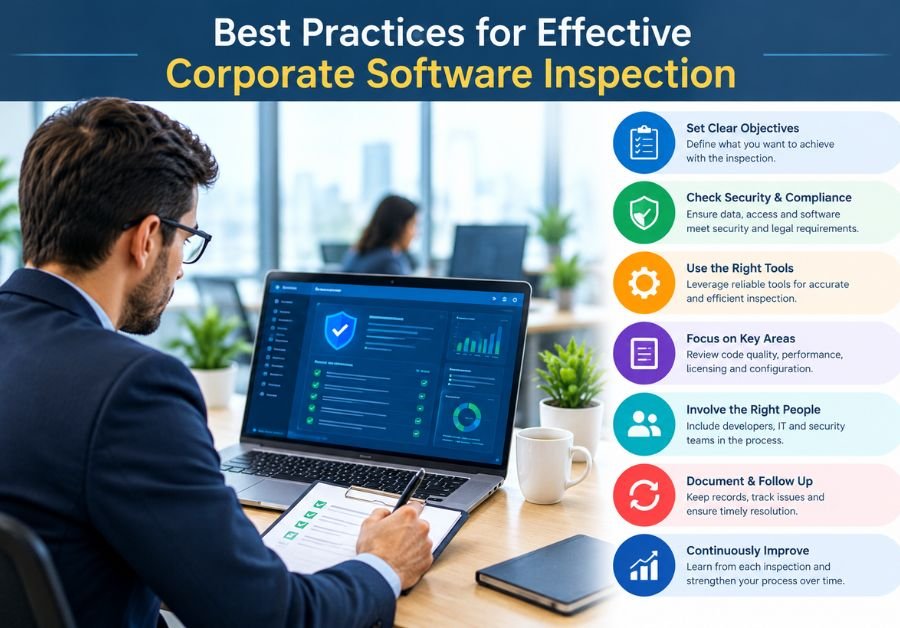
Businesses can improve inspection results by adopting consistent processes and focusing on meaningful risks.
Establish Clear Inspection Standards
Create documented procedures that explain what inspectors should examine, which requirements they should follow, and how they should report issues.
Consistent standards make findings easier to compare across projects and inspection cycles.
Use Suitable Inspection Tools
Choose tools that match the software, inspection objectives, and technical environment. Static code analysis, automated testing, security scanning, and issue tracking can each support different activities.
Tools should complement professional judgment rather than replace it.
Prioritize High-Risk Components
Focus attention on software components that could cause significant operational, financial, privacy, or security problems.
Risk-based inspection helps teams use their resources where they can provide the greatest value.
Maintain Accurate Documentation
Record findings, supporting evidence, corrective actions, and verification results. Good documentation helps teams understand previous problems and track recurring defects.
It also supports communication between technical staff and business stakeholders.
Verify Fixes Before Closing Issues
An issue should not be considered resolved simply because a developer reports a change.
Inspectors should perform appropriate checks to confirm that the correction works and has not introduced another problem.
Review and Improve the Process
Organizations should periodically review inspection results, recurring defects, and delays in issue resolution.
These reviews can reveal opportunities to improve testing coverage, update standards, and provide additional training.
Different tools support different parts of the inspection process. The appropriate choice depends on the software, the team’s skills, and the organization’s requirements.
Static Code Analysis Tools
Static analysis tools examine source code without necessarily executing the application. They can help identify certain coding errors, maintainability problems, and potential security weaknesses.
For example, SonarQube supports code quality analysis and can help teams track identified issues.
Automated Testing Tools
Automated testing tools execute predefined checks to determine whether software behaves as expected.
Selenium supports browser automation, while other testing frameworks may be more suitable for application programming interfaces, mobile applications, or unit tests.
Automated tests can improve repeatability, but they only check the scenarios that teams have designed.
Security Testing Tools
Security testing tools help identify potential vulnerabilities and configuration weaknesses. OWASP ZAP, for example, supports web application security testing.
Teams should use security tools only on systems they own or have explicit permission to assess. Automated findings also require appropriate interpretation and verification.
Issue Tracking and Documentation Tools
Issue tracking platforms help teams record defects, assign responsibility, monitor progress, and document resolutions.
Jira is one example of a platform used to manage issues and development work. A well-maintained tracking process helps ensure that important findings receive appropriate attention.
Corporate Software Inspector vs. Software Tester
Corporate software inspectors and software testers share the goal of improving software quality, but their responsibilities may differ depending on the organization.
| Area | Corporate Software Inspector | Software Tester |
| Main focus | Inspection against defined requirements, standards, and quality expectations | Checking software behavior through planned tests |
| Typical activities | Reviewing software, documenting findings, checking compliance, and identifying quality concerns | Running functional, integration, regression, and other tests |
| Methods | May include documentation reviews, code inspection, configuration checks, and testing | Often uses manual or automated test cases |
| Main output | Inspection findings and recommendations | Test results, defect reports, and coverage information |
| Role variation | Depends on company structure and inspection scope | Depends on testing responsibilities and project needs |
These roles can overlap significantly. A software tester may perform code reviews or compliance checks, while an inspector may run tests to verify a finding.
The job title alone does not determine the full scope of work. Organizations define responsibilities according to their quality processes and technical needs.
Career Opportunities for a Corporate Software Inspector
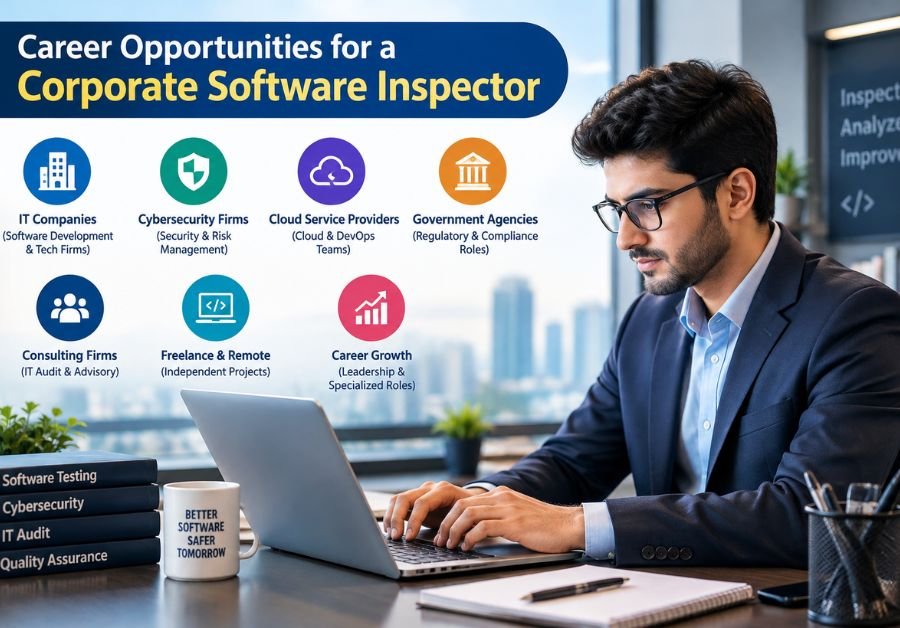
People interested in software inspection can develop careers in software quality, testing, technical auditing, and related technology fields.
A degree in computer science, software engineering, information technology, or a related discipline can be helpful. However, educational requirements vary by employer, and some positions also value practical experience, technical training, or relevant certifications.
Aspiring inspectors can build their skills by learning software testing fundamentals, understanding databases, practicing code reviews, and working with issue tracking tools.
Useful career paths may include:
- Software Quality Assurance Analyst
- Software Test Engineer
- Software Quality Engineer
- Software Auditor
- Application Security Analyst
- Quality Assurance Lead
Practical experience is important. Candidates can create small software projects, document sample defects, practice writing test cases, and learn how to communicate technical findings.
With experience, professionals may move into senior quality roles, inspection management, or specialized software security and compliance work.
Conclusion
A corporate software inspector helps organizations evaluate software quality, identify technical problems, and document improvements. The role can involve reviewing functionality, examining selected security controls, checking requirements, and working with technical teams to resolve defects.
Effective software inspection requires technical knowledge, attention to detail, analytical thinking, and clear communication. Organizations can strengthen the process by using suitable tools, maintaining accurate documentation, prioritizing high-risk components, and verifying corrections.
As businesses continue to depend on digital systems, software inspection remains a valuable part of software quality management. A consistent and well-planned approach can help companies improve reliability, manage risks, and support their long-term technology goals.
(FAQs)
1. What Is a Corporate Software Inspector?
A corporate software inspector is a professional who examines software to identify defects, evaluate quality, review relevant requirements, and document issues that may affect business operations.
2. What Does a Corporate Software Inspector Do?
The role may include reviewing software functionality, identifying technical errors, examining selected security controls, checking requirements, preparing inspection reports, and verifying corrections.
3. What Skills Are Required for This Role?
Useful skills include software testing, analytical thinking, attention to detail, technical documentation, problem-solving, communication, and basic security knowledge.
4. Why Is Corporate Software Inspection Important?
Software inspection helps businesses identify problems, improve reliability, support risk management, and maintain applications that meet their defined requirements.
5. Which Tools Can Support Software Inspection?
Depending on the task, teams may use SonarQube for code quality analysis, Selenium for browser automation, OWASP ZAP for authorized web security testing, and Jira for issue tracking.